Introduction
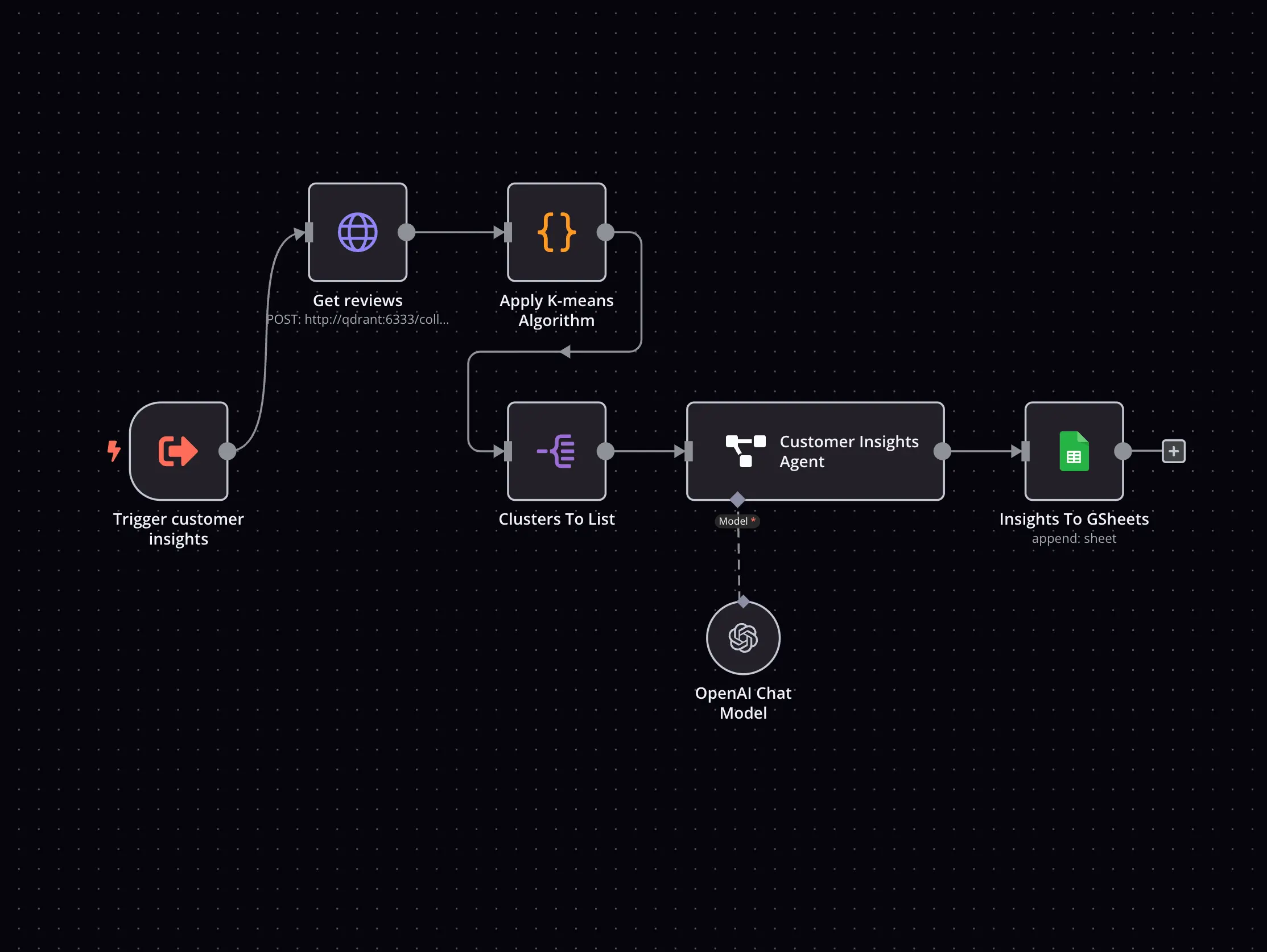
n8n is an open-source workflow automation tool designed to automate repetitive tasks, integrate applications, and streamline processes across various systems. By leveraging AI and a visual workflow builder, n8n allows users to automate complex workflows without needing to write extensive code. Whether you’re managing a business’s operations, automating marketing campaigns, or integrating tools across different departments, n8n enables seamless automation that saves time, reduces errors, and increases productivity.
Competitor Comparison
n8n competes with other automation tools such as Zapier, Make, and Integromat, offering the key advantage of being open-source with the ability for deep customisation.
| Tool | Strengths |
|---|---|
| n8n | Open-source, highly customisable, advanced integrations |
| Zapier | User-friendly, connects thousands of apps, great for simple workflows |
| Make | Visual automation builder, suitable for complex automations |
| Integromat | Visual builder, strong in custom workflows and multi-step automation |
Pricing & User Base
At the time of writing, n8n offers a free open-source version, with premium plans starting from approximately USD $20/month for cloud-hosted services, team collaboration features, and additional workflows.
Primary Users: Developers, automation enthusiasts, business owners, and operations teams looking to streamline their processes and integrate multiple systems.
Difficulty Level
Hard – n8n’s visual interface makes it accessible for non-technical users, while its advanced features provide extensive customisation for developers and power users.
Use Case Example
Imagine you’re running a marketing agency and need to automate client onboarding. With n8n, you can:
Integrate Systems: Connect your CRM, email marketing software, and invoicing platform.
Automate Client Data: Automatically add new client details into your CRM and send a welcome email.
Trigger Tasks: Create a task in your project management system, like Trello or Asana, to start a campaign setup for the new client.
This saves you hours of manual work and ensures a consistent, smooth experience for every client.
Pros and Cons
Pros
- Open-source, free to use and highly flexible
- Extensive integration options with apps and services
- No-code workflow automation with a visual interface
- Highly customisable with deep control over workflows
Cons
- Can be complex for users without technical backgrounds
- Premium features require a subscription
- Cloud-hosted version limits access to some advanced features
Integration & Compatibility
n8n integrates with:
Google Suite, Slack, Trello, and Asana for task management and communication
Salesforce, HubSpot, and Mailchimp for CRM and marketing automation
Zapier, Make, and other platforms for extending integrations and automation
These integrations ensure that n8n fits seamlessly into your existing workflow and tech stack.
Support & Resources
n8n provides:
Access to an open-source community forum for support and feature requests
Comprehensive documentation and tutorials for beginners and advanced users
Paid support for enterprise-level users
If you want to explore how AI can accelerate your growth, consider joining a Nimbull AI Training Day or reach out for personalised AI Consulting services.
Introduction
n8n is an open-source workflow automation tool designed to connect applications, automate repetitive tasks, and orchestrate complex processes across systems. Using a visual workflow builder combined with optional AI-driven logic, n8n enables users to design powerful automations without writing extensive code. It is especially well suited to teams that need flexibility, ownership of their workflows, and deeper control than typical no-code automation platforms allow.
Whether you are automating internal operations, marketing processes, or cross-department integrations, n8n helps reduce manual effort, minimise errors, and improve overall efficiency.
Competitor Comparison
Compared to tools such as Zapier, Make, and Integromat, n8n’s key differentiator is its open-source foundation. This allows for deeper customisation, self-hosting, and advanced logic that goes beyond typical plug-and-play automations.
| Tool | Target Users | Key Reason to Choose n8n |
|---|---|---|
| Zapier | Small businesses | n8n offers deeper customisation and ownership |
| Make | Power users | n8n provides open-source flexibility |
| Integromat | Automation builders | n8n supports self-hosting and advanced logic |
| n8n | Developers & ops teams | Full control with visual workflows and AI logic |
Primary User
- Developers and technical teams
- Automation enthusiasts and power users
- Business owners managing complex systems
- Operations and IT teams integrating multiple platforms
Pricing & User Base
n8n offers a free, open-source version that can be self-hosted with no licensing costs.
Premium cloud-hosted plans start from approximately USD $20 per month and include hosted infrastructure, collaboration features, and additional workflow capacity.
n8n has a rapidly growing global user base spanning startups, agencies, and enterprise teams that require custom automation beyond off-the-shelf tools.
Difficulty Level
n8n is categorised as Advanced.
While its visual interface makes basic workflows accessible to non-technical users, its full power is best unlocked by users comfortable with logic, APIs, and system integrations.
Use Case Example
Task: A marketing agency wants to automate client onboarding.
Workflow built in n8n:
Connect the CRM, email platform, and invoicing system
Automatically add new client details to the CRM
Trigger a personalised welcome email
Create onboarding tasks in tools like Trello or Asana
Result / Impact:
Hours of manual admin work eliminated
Consistent onboarding experience for every client
Faster campaign kick-off and fewer errors
This highlights how n8n supports complex, multi-step automation across business systems.
Pros and Cons
Pros
- Open-source and free to self-host
- Highly flexible with deep workflow control
- Visual builder with optional no-code setup
- Extensive integrations and custom logic support
Cons
- Steeper learning curve for non-technical users
- Some premium features require a paid plan
- Cloud-hosted version limits certain advanced configurations
Integration & Compatibility
n8n integrates with a wide range of tools, including:
- Google Workspace, Slack, Trello, and Asana
- Salesforce, HubSpot, and Mailchimp
- APIs and external services for custom integrations
These integrations allow n8n to fit seamlessly into complex tech stacks and enterprise workflows.
Support & Resources
n8n provides:
An active open-source community forum
Comprehensive documentation and tutorials
Paid support options for enterprise users
Conclusion
n8n is a powerful automation platform for teams that need flexibility, transparency, and control. Its open-source nature, combined with a visual workflow builder and AI-ready logic, makes it an excellent choice for organisations looking to move beyond basic automation. For developers, operations teams, and advanced users, n8n offers a level of customisation that few automation tools can match.
If you want to explore how AI can accelerate your growth, consider joining a Nimbull AI Training Day or reach out for personalised AI Consulting services.