Introduction
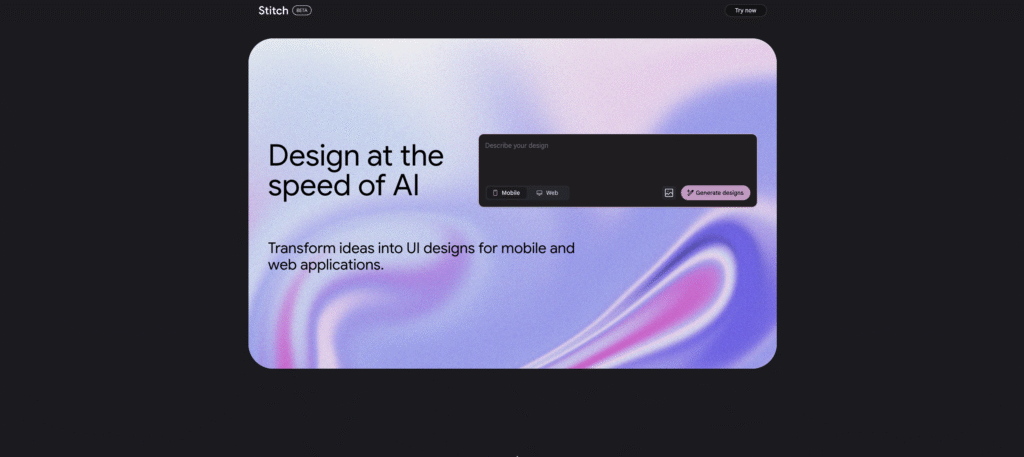
Google Stitch is an experimental AI powered tool developed by Google Labs that enables users to generate mobile and web application user interfaces from simple text prompts or images. Leveraging the multimodal capabilities of Gemini 2.5 Pro, Stitch streamlines the design to development workflow by turning ideas into UI layouts and frontend code in minutes.
Instead of relying on traditional design tools and manual prototyping, Stitch allows users to describe an interface in plain English or upload sketches, which are then converted into editable UI designs. This significantly accelerates early stage product development and helps teams iterate faster on ideas.
Competitor Comparison
Here is how Google Stitch compares with other UI design and prototyping tools:
| Tool | Description |
|---|---|
| Google Stitch | AI driven UI generation from text and images with code export |
| Figma | Collaborative design platform with strong UI/UX capabilities |
| Adobe XD | UI and UX design tool with prototyping features |
| Framer | Interactive design and website building platform |
| Uizard | AI based UI design tool for rapid prototyping |
Compared with traditional tools like Figma and Adobe XD, Stitch stands out by automating UI creation through AI rather than requiring manual design work.
Primary Users
The main users of Google Stitch include:
- Startup founders building rapid prototypes for apps and digital products.
- Product managers who need quick visual representations of ideas.
- UI and UX designers exploring design concepts and layouts.
- Developers looking to generate frontend code quickly.
- Innovation teams testing concepts without heavy design investment.
Difficulty Level
Google Stitch is categorised as Easy to Moderate difficulty.
- Beginners can generate UI layouts using simple text prompts.
- The interface is designed to be intuitive and conversational.
- Advanced users may explore exporting code and refining designs further.
- Some understanding of UI principles helps improve output quality.
Use Case Example
Here is a practical use case showing how Google Stitch can accelerate product design.
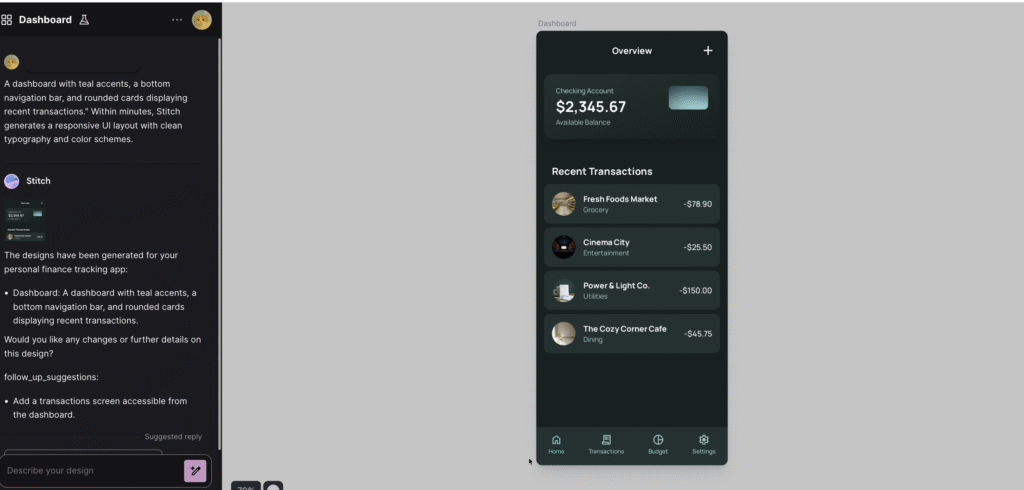
Task: A startup founder wants to prototype a mobile app for personal finance tracking.
Steps:
- The founder enters a prompt such as
“A dashboard with teal accents, a bottom navigation bar and rounded cards showing recent transactions.” - Google Stitch generates a responsive UI layout based on the description.
- The founder reviews multiple variations and selects the preferred design.
- The UI is exported as HTML and CSS or sent directly to Figma for further refinement.
- Additional changes are made through conversational prompts such as adjusting colours or typography.
Result/Impact
Using Google Stitch can significantly improve the speed of UI design and prototyping.
- Design concepts can be created within minutes instead of days.
- Teams can iterate quickly with multiple layout variations.
- Developers receive ready to use frontend code for faster implementation.
- Early stage product ideas can be validated without large design costs.
This allows businesses and startups to move faster from idea to working prototype.
Pros and Cons
Pros
- Fast UI prototyping from text or image inputs.
- Generates multiple design variations quickly.
- Export options for frontend code and Figma integration.
- Conversational interface makes iteration simple.
- Free to use during experimental phase.
Cons
- Limited to English language prompts.
- Visual styling may be basic compared to advanced design tools.
- Primarily focused on single screen interfaces.
- Features and availability may change as the tool evolves.
Integration & Compatibility
Google Stitch supports integration across design and development workflows.
- Export designs as HTML and CSS for direct developer use.
- Compatible with Figma for further UI and UX refinement.
- Supports both web and mobile design contexts.
- Works with modern frontend frameworks after export.
This flexibility makes it useful for both designers and developers working together.
Support & Resources
As an experimental tool, Google Stitch provides basic support and learning resources.
- Built in tutorials and guidance within the interface.
- Documentation explaining features and workflows.
- Access via Google account through the Stitch platform.
- External tutorials such as Codecademy resources for deeper learning.
For teams looking to rapidly transform ideas into functional UI designs, Google Stitch offers a powerful introduction to AI driven product design.
If you want to explore how AI can accelerate your growth, consider joining a Nimbull AI Training Day or reach out for personalised AI Consulting services.
What Is Google Stitch?
Google Stitch is an experimental AI-powered tool developed by Google Labs that enables users to generate mobile and web application user interfaces (UIs) from simple text prompts or images. Leveraging the multimodal capabilities of Google’s Gemini 2.5 Pro model, Stitch facilitates rapid UI design and frontend code generation, streamlining the design-to-development workflow.
Core Features
- Text-to-UI Generation: Describe your desired interface in plain English, and Stitch will generate a corresponding UI layout.
- Image-to-UI Conversion: Upload sketches, wireframes, or screenshots, and Stitch will interpret them to create editable UI designs.
- Rapid Iteration: Generate multiple design variants to explore different layouts and styles quickly.
Seamless Export: Export designs as HTML/CSS code or directly to Figma for further refinement. - Conversational Refinement: Iterate on designs through an interactive chat interface, making adjustments to elements like color schemes and typography.
Pricing & User Base
Google Stitch is currently available for free as part of Google Labs. There are no paid plans or usage limits announced at this time. However, as an experimental product, access may be limited or subject to change in the future.
Use Case Example
Scenario: A startup founder needs to quickly prototype a mobile app for tracking personal finances.
Solution: Using Google Stitch, the founder describes the desired interface: “A dashboard with teal accents, a bottom navigation bar, and rounded cards displaying recent transactions.” Within minutes, Stitch generates a responsive UI layout with clean typography and color schemes.
Pros and Cons
Pros
- Fast UI prototyping from text or images
- Multiple design variants for quick iteration
- Seamless export to Figma and frontend code
- Free to use during experimental phase
Cons
- Limited to English-language prompts
- Basic visual styling; may lack advanced aesthetics
- Primarily designed for single-screen interfaces
- Features and access may change as the product evolves
Integration & Compatibility
Stitch supports both web and mobile UI design, allowing users to specify device context (mobile or web) for responsive layouts. Designs can be exported as HTML/CSS code or pasted directly into Figma, facilitating smooth collaboration between designers and developers.
Support & Resources
As an experimental tool, Google Stitch offers basic support through its interface, including tutorials and documentation. Users can access the tool via their Google account at stitch.withgoogle.com. For more detailed guidance, resources like Codecademy’s tutorial on designing app UIs with Google Stitch are available.
If you want to explore how AI can accelerate your growth, consider joining a Nimbull AI Training Day or reach out for personalised AI Consulting services.