Introduction
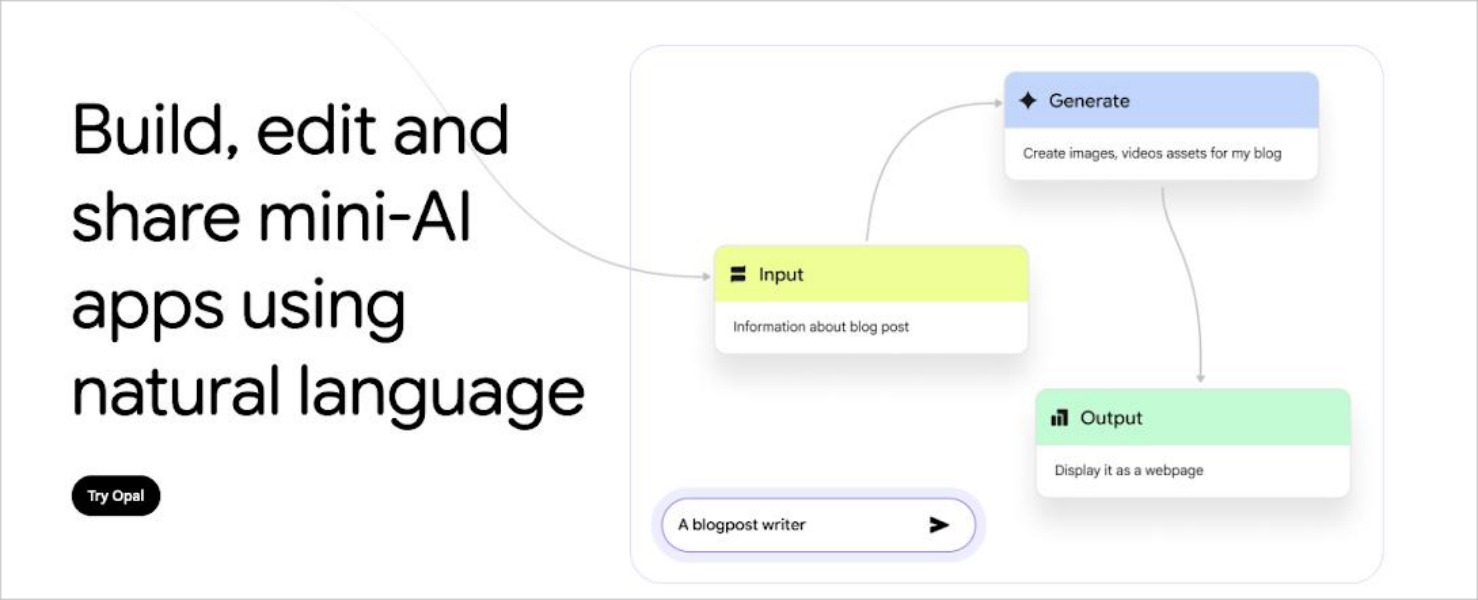
Google Opal is a modern, AI-powered no-code workflow automation platform designed to help businesses, developers, and teams optimise operations through intelligent automation. By combining artificial intelligence with deep integration across the Google ecosystem, Opal enables users to streamline repetitive tasks, build custom “AI mini-apps” using natural language, improve collaboration, and generate actionable insights.
Competitor Comparison
Google Opal is a visual AI app builder rather than a traditional background automation tool, its competitors look a bit different. Here is how it compares:
| Tool | Description |
|---|---|
| Google Opal | Visual, prompt-based builder for creating interactive AI-powered mini-apps |
| MindStudio | Powerful no-code platform for building complex AI applications and agents |
| Flowise | Open-source, drag-and-drop UI for building LLM apps and workflows |
| Canva Code | Prompt-based app creation deeply integrated with Canva's design suite |
| Zapier / Make | Background workflow automation based on triggers and events (rather than interactive UI apps) |
Compared with background workflow tools, Google Opal stands out by generating actual user interfaces (with input fields, file uploads, and output displays) that your team can actively interact with.
Primary Users
- Business teams managing workflows across Google Workspace tools.
- Marketing teams coordinating campaigns and reporting.
- Developers building automation processes and integrations.
- Operations teams improving efficiency and reducing manual tasks.
- Professionals seeking to streamline day to day activities.
Difficulty Level
Google Opal is categorised as Easy to Moderate difficulty.
- Beginners can quickly create basic workflows using simple configurations.
- The interface is intuitive and aligned with Google Workspace tools.
- Advanced workflows involving multiple integrations and conditions may require some learning.
- Developers can extend capabilities using APIs and custom logic.
This balance makes it accessible while still powerful.
Use Case Example
Here is a practical example of how Google Opal can streamline marketing workflows.
Task: A marketing team wants to automate campaign management across Google Workspace.
Steps:
- Configure Opal to monitor incoming emails and automatically categorise them by priority.
- Sync campaign data across Google Sheets and Google Docs.
- Generate automated reports summarising campaign performance.
- Trigger notifications and follow ups based on campaign milestones.
- Continuously update dashboards with real time data.
Result/Impact
Using Google Opal can significantly improve operational efficiency.
- Reduces time spent on repetitive administrative tasks.
- Improves data accuracy by automating updates across systems.
- Enhances collaboration through shared workflows.
- Enables faster decision making with real time insights.
For teams managing multiple workflows, this leads to better productivity and organisation.
Pros and Cons
Pros
- AI powered automation improves workflow efficiency.
- Deep integration with Google Workspace tools.
- User friendly interface for quick adoption.
- Reduces manual errors and repetitive work.
- Suitable for teams of all sizes.
Cons
- Advanced features may require premium subscription plans.
- Dependent on internet connectivity for cloud based operations.
- Complex workflows may require some learning and setup time.
- Limited integration options with non Google tools in certain cases.
Integration & Compatibility
Google Opal integrates seamlessly with modern cloud environments.
- Google Workspace including Gmail, Google Docs, Google Sheets and Google Drive.
- Web based platform accessible from desktop and mobile devices.
- API support for custom integrations and extended functionality.
- Compatible with collaboration and reporting workflows.
These integrations allow businesses to centralise operations and automate processes efficiently.
Support & Resources
Google Opal provides a range of resources to support users.
- Tutorials and step by step guides for building workflows.
- FAQs covering common use cases and troubleshooting.
- Community forums for sharing automation ideas and best practices.
- Direct support options for premium users.
For businesses looking to optimise workflows and leverage AI within the Google ecosystem, Google Opal offers a powerful and scalable automation solution.
If you want to explore how AI can accelerate your growth, consider joining a Nimbull AI Training Day or reach out for personalised AI Consulting services.
Introduction
Google Opal is a cutting-edge AI tool designed to help businesses, developers, and professionals optimise workflows through intelligent automation. With its robust capabilities, Opal integrates seamlessly with Google’s ecosystem to simplify complex tasks, enhance collaboration, and increase efficiency. From automating repetitive processes to generating actionable insights, Google Opal empowers teams to focus on strategic work rather than mundane tasks.
Competitor Comparison
Google Opal competes with workflow automation tools such as Zapier, Make, and n8n, offering tight integration with Google products and AI-driven optimisation.
| Tool | Strengths |
|---|---|
| Google Opal | Deep Google ecosystem integration, AI-powered workflow automation |
| Zapier | Easy-to-use, supports thousands of apps |
| Make | Visual automation builder, highly customisable |
| n8n | Open-source flexibility, developer-friendly |
Pricing & User Base
Google Opal provides a free tier with basic automation capabilities, while premium plans offer advanced AI-driven features and priority support.
Primary Users: Businesses, marketers, developers, IT teams, and productivity enthusiasts.
Difficulty Level
Easy to Moderate – Google Opal is designed to be user-friendly for beginners, while also offering advanced options for power users and developers.
Use Case Example
Imagine a marketing team managing multiple campaigns across Google Workspace. With Google Opal, they can:
Automatically organise and tag emails based on priority
Sync campaign data across Google Sheets and Docs
Generate reports summarising team performance
Automate repetitive follow-ups and notifications
By streamlining these tasks, teams save time, reduce errors, and enhance productivity.
Pros and Cons
Pros
- AI-powered automation for smarter workflows
- Tight integration with Google Workspace
- User-friendly interface for quick adoption
- Reduces repetitive tasks and human error
Cons
- Some advanced features require a premium plan
- Dependent on internet connectivity
- May require learning for highly custom workflows
- Limited support for non-Google apps in some cases
Integration & Compatibility
Google Opal works across Google Workspace apps including Gmail, Docs, Sheets, and Drive. Its cloud-based platform ensures compatibility on all devices, making workflow management seamless across teams.
Support & Resources
Google Opal offers comprehensive resources such as tutorials, FAQs, community forums, and direct support for troubleshooting and advanced guidance.
If you want to explore how AI can accelerate your growth, consider joining a Nimbull AI Training Day or reach out for personalised AI Consulting services.